Your workplace
Microsoft 365 managed security and compliance
Your Microsoft 365 set up properly, kept secure and watched, from A$100 a month. On the Partner plan we also assess you against BSO Cloud Essentials and your AI tools setup, including Copilot, for a full review of your operations security. Month to month, prices ex GST.
Microsoft partner programs
These are Microsoft partner program enrolments. Microsoft has not reviewed or endorsed our products or services.
Watch
For the small team that want an external security check.
A$100 a month
MonitorMost popular
For businesses that want a hands-on admin service.
A$250 a month
Partner
For businesses that need IT operations fully supported.
A$500 a month
Core services
The Microsoft 365 work we do for you, from your plan's monthly hours.
User management
Microsoft 365 administration
Support
Laptops, phones and on-site support stay with your IT provider. We work alongside them.
Monitoring, reports and alerts are always included and never use your hours. Your monthly hours cover user changes, password and multifactor resets, tickets, configuration and dealing with your IT provider. Unused hours do not roll over. Larger fixes and extra work are A$125 an hour, agreed with you before they start. These plans are security-focused: they do not include a helpdesk or device support, so they work alongside your IT provider or on their own if you only run Microsoft 365.
What we watch and fix
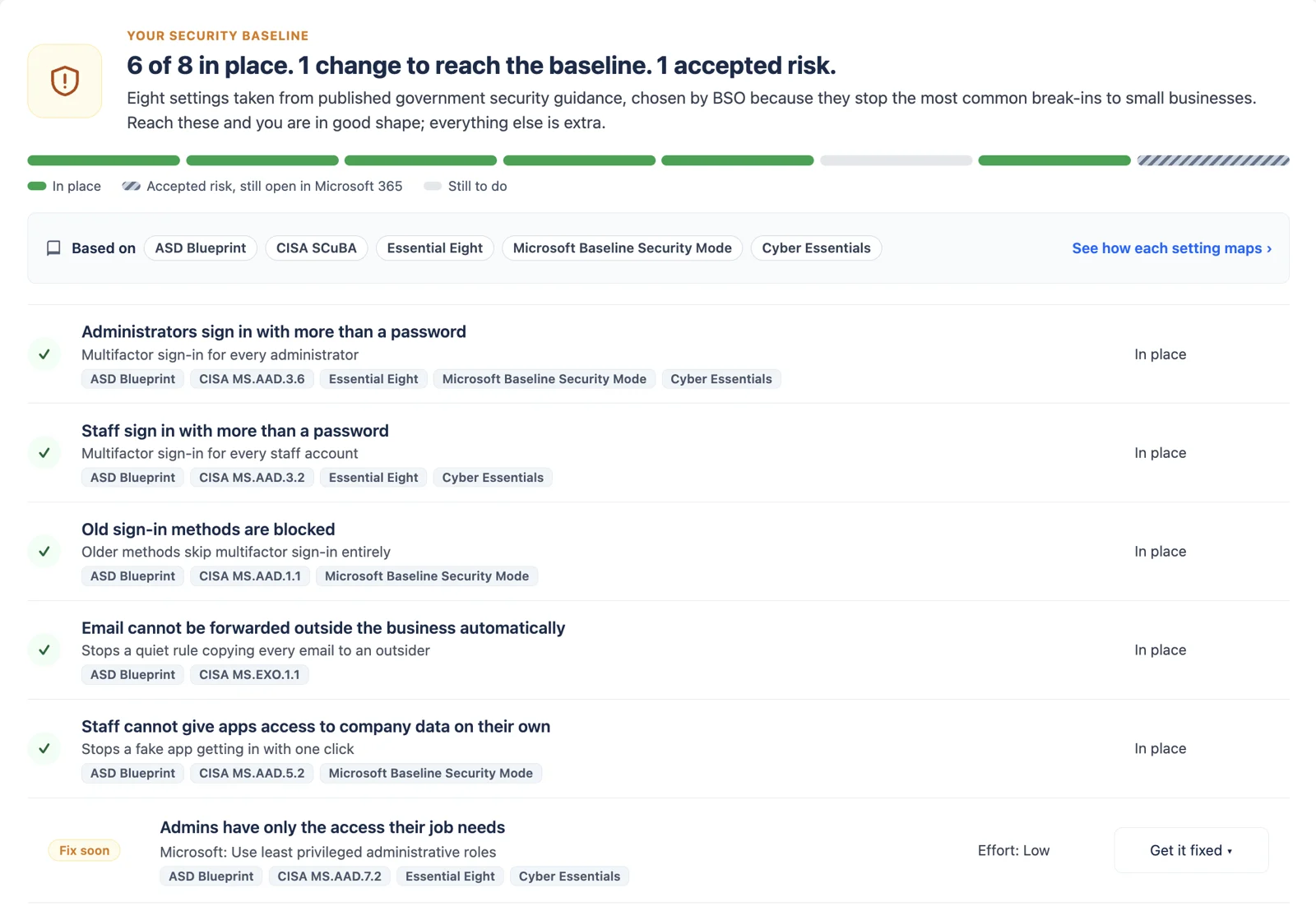
The eight settings that block the most common break-ins, watched by us, for you.
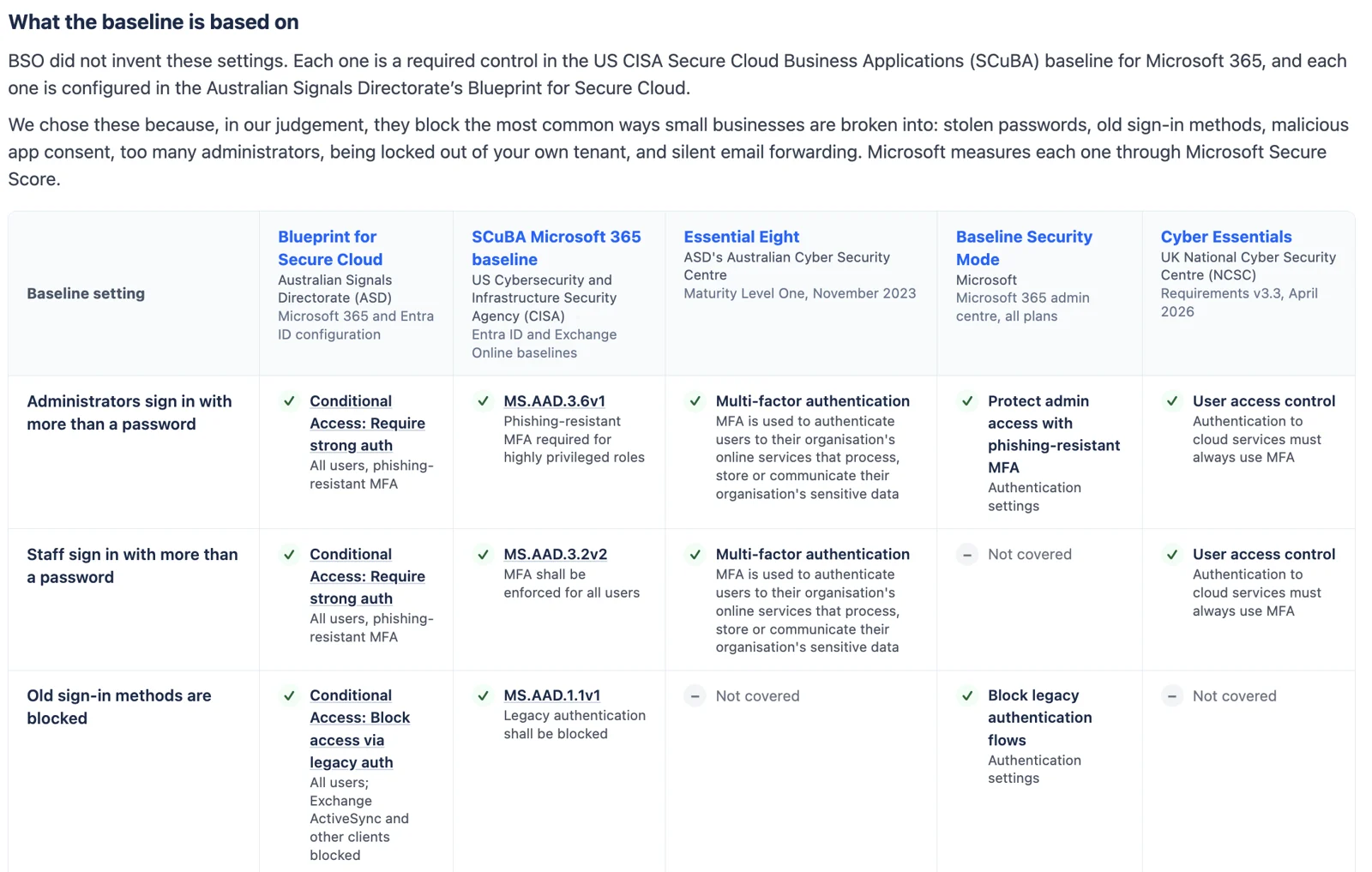
Our diagnostic checks the eight settings in our Microsoft 365 security baseline, each a required control in CISA's SCuBA baseline and configured in ASD's Blueprint for Secure Cloud. When something is wrong, we tell you in plain English and fix it from your plan's hands-on hours.
Administrators sign in with more than a password
Multifactor sign-in on every admin account, the keys to everything.
Staff sign in with more than a password
Multifactor sign-in for everyone, so a stolen password is not enough.
Old sign-in methods are blocked
Legacy sign-ins that skip multifactor are switched off.
Email cannot be forwarded outside automatically
Stops rules that quietly send your mail elsewhere, a common sign of takeover.
Staff cannot give apps access on their own
Apps asking for company data need an administrator's approval.
Admins have only the access they need
Fewer global administrators, each with a reason to be one.
A backup administrator account
A way back in if your main admin account is locked or compromised.
Mailbox activity is recorded
Audit logging on, so there is a record if something goes wrong.
When we find something
Part of one service
On the Partner plan, your diagnostic scan results become evidence for your BSO Cloud Essentials assessment. Pair it with software testing to cover your product too.
Not our opinion
Every setting maps to published guidance
We did not invent the baseline. Each setting is a required control in CISA's SCuBA baseline and configured in ASD's Blueprint for Secure Cloud, and the diagnostic shows you where each one also appears in the Essential Eight, Microsoft's Baseline Security Mode and Cyber Essentials.
Compliance, built in
From a secure baseline to a posture you can prove
Every plan keeps your settings to our security baseline. The Partner plan goes further and assesses your business against BSO Cloud Essentials: a small-business profile of ASD's Essentials for cloud, selected by Biz Secure Online from ASD's published actions.
Watch and Monitor
Your security baseline
The eight Microsoft 365 settings that block the most common break-ins, checked and kept in place.
Partner
BSO Cloud Essentials
Each control rated with evidence, a report and a prioritised plan, reviewed every month and worked through from your plan hours.
When you need more
A standards project
ISO 27001, ISO 9001 or the full Essentials for cloud, scoped with you as a project.
AI governance, built in
Use AI tools, including Copilot, without handing them your whole business
Copilot can read anything your staff can reach in SharePoint, Teams and OneDrive, and other AI apps ask for access to your company data. We set the rules, lock down what they can reach, and check it stays that way.
In the Partner plan
AI governance, every month
A project
Copilot and AI readiness as a work activity
For when you are about to switch on Copilot, or your team is already using AI tools without rules.
A$125 an hour, quoted before we start
Talk to us about AI readinessBased on the Australian Government's Guidance for AI Adoption (National AI Centre, October 2025) and the AI accountability action in ASD's Essentials for cloud.
Getting started
| One-off | Price | What it covers |
|---|---|---|
| Onboarding your existing tenant | A$250 | Secure admin access, our security solution connected, baseline reviewed, kick-off call |
| Quick start: a new Microsoft 365 tenant | A$450 for up to 5 staff, then A$50 each A$250 with 6 months on Monitor or Partner | Tenant and licences, domain and email security records, staff accounts, security baseline, Teams, SharePoint and OneDrive, handover. Email migration quoted separately. |
| Microsoft 365 licences | Microsoft's price | Billed monthly through us as a Microsoft CSP Indirect Reseller |
Our tool
See where your Microsoft 365 stands, free
Our Microsoft 365 security diagnostic checks the eight settings that stop most break-ins, each taken from published government guidance. It only reads your settings and changes nothing.
Run the free check